
اضافة وتعديل الشركاء
مايو 30, 2023
[mhc_section admin_label=”قسم” fullwidth=”on” specialty=”off”][mhc_fullwidth_post_header admin_label=”عنوان المقالة بعرض كامل” title=”on” meta=”off” avatar=”off” author=”off” date=”off” categories=”off” comments=”off” views=”off” show_ratings=”off” show_excerpt=”off” show_share=”on” text_orientation=”center” text_color=”dark” featured_image=”on” featured_placement=”below” parallax=”off” parallax_method=”off” bg_color=”#dddddd” custom_paddings=”40″ size=”26px” title_bold=”on” text_shadow=”off” text_background=”off” text_bg_color=”#ffffff” overlay=”on” animation=”off”] [/mhc_fullwidth_post_header][/mhc_section][mhc_section admin_label=”section”][mhc_row admin_label=”row”][mhc_column type=”4_4″][mhc_text admin_label=”نص” background_layout=”light” text_orientation=”right” animation=”off”]
كيفية اضافة / تعديل صور الشركاء
1) من القائمة الموجودة في جهة اليمين نقوم باختيار الموقع > الشركاء
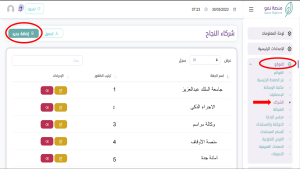
ستظهر قائمة بالشركاء المضافين مسبقا
2) نقوم بالضغط على إضافة جديد
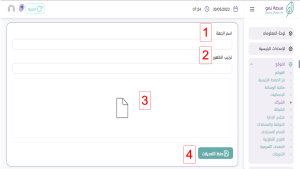
3) نقوم بتعبة التفاصيل على النحو التالي :
- قم بكتابة اسم الشريك
- قم بكتابة ترتيب الظهور ( ترتيب الظهور هو ترتيب عرض الصورة بين مجموعة صور الشركاء ) وفي حال ترك الخانة فارغة سيقوم النظام بترتيب الصورة بشكل تلقائي على حسب الاضافة
- قم بإضافة صورة شعار الشريك
- حفظ التعديلات